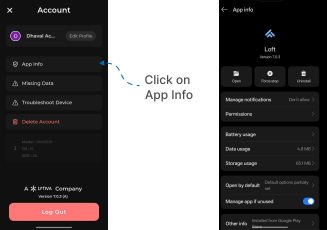
App Info
This guide explains how to view App Info in the Loft App.
Watch The Video Tutorial
Steps to View App Info
-
Open the Loft App
-
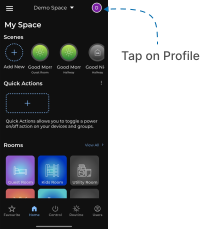
Access Profile Settings
- Tap on the Profile icon located at the top-right corner of the screen.
- The Account screen will open.
- Open App Info
- Tap on App Info, located below your name.
- The App Info screen will appear displaying detailed information.
- You can check various details such as:
- App Permissions (what permissions the Loft App has)
- Manage Notifications
- Battery Usage
- Data Usage
- Storage Usage, and more.